 Split Guru
SMS consent
How people agree to get sign-in codes by text
Split Guru texts one-time sign-in codes, and nothing else. People agree to them in the Split Guru iPhone app, before they have an account:
- On the first screen they tap Get Started, under which the app says “By continuing, you agree to the Terms of Use.”
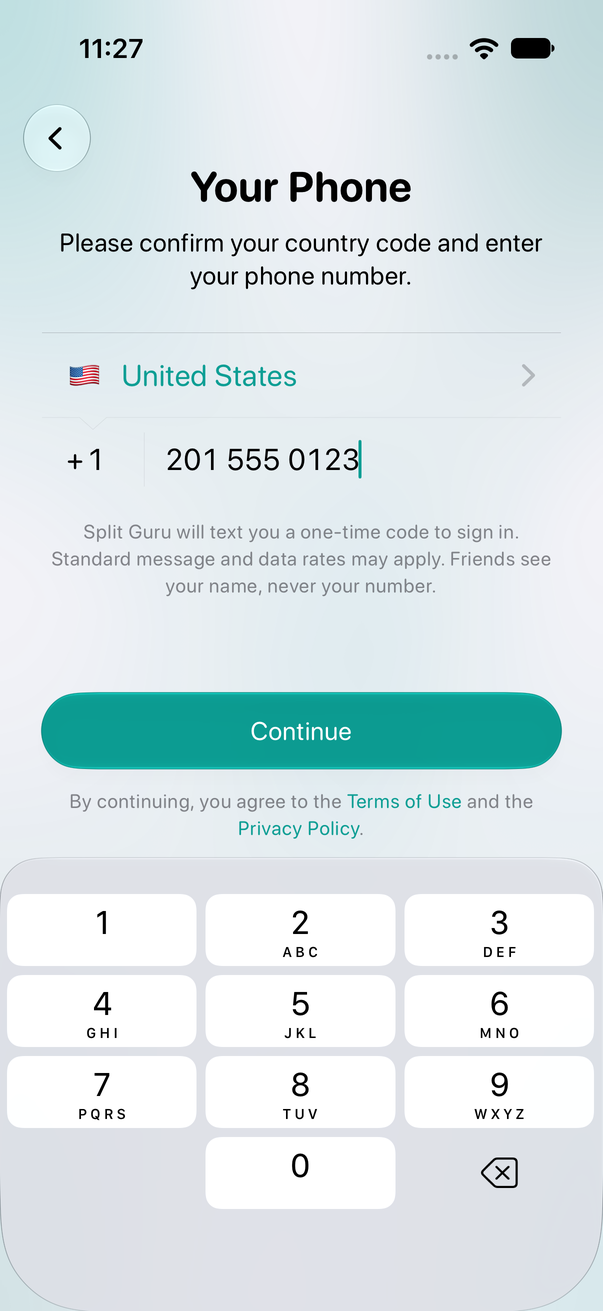
- On Your Phone they type their own mobile number. The screen says “Split Guru will text you a one-time code to sign in. Standard message and data rates may apply.” Under Continue it says “By continuing, you agree to the Terms of Use and the Privacy Policy”, with links to both.
- When they tap Continue, Split Guru texts one code to that number: “Your Split Guru code is 123456. Don’t share it with anyone.” Another code is sent only when they ask for one.
Replying STOP to any of our texts stops them, START brings them back, and HELP gets help. The SMS Terms and the Privacy Policy explain these texts; we do not sell or share personal information with third parties for marketing purposes.